Rostraver Public Library & Smithton Public Library
Menu
  • Programs
    • Children
    • Tweens & Teens
    • Adults
  • About Us
    • About
    • Photos
    • Policies
    • Employment Opportunities
  • Support Us
    • Become a Volunteer!
    • Donate Now
    • Ways to Donate
    • Fill a Bag of Books
    • Raise the Roof Campaign
  • Resources
    • Catalogs
  • Smithton Public Library
Menu

Category: Power Library Tips

Power Library Tip #2: Auto Repair Source

Posted on December 2, 2019December 2, 2019 by Laura Daugherty

Among the many resources available through Power Library, one particular database is an invaluable household tool. The Auto Repair Source database allows you to investigate solutions on how to fix a problem with your vehicle. It allows you to find “the most accurate, authoritative and up-to-date service and repair information for thousands of domestic and imported vehicles. All content comes from the Original Equipment Manufacturer (OEM) and includes step-by-step repair information, diagrams, maintenance schedules, parts and labor estimates, service bulletins and recalls.”

Let’s walk through a sample repair using Auto Repair Source. Example: You have decided to replace and repair the brakes shoes on your 2014 Ford Focus SE.  Start by visiting Rostraver Public Library’s website and then click on the Power Library icon found on the right hand side of the screen. It looks like this:
Scroll down until you see the icon link for Auto Repair Source. It looks like this:

Click on the Auto Repair Source icon. The first step is to select the correct information in the drop-down box to identify your vehicle: Year, Make, Model, and Engine.  In our example, you would choose 2014, Ford, Focus SE and 2.0L.

Once you have identified your vehicle, a long alphabetical list of potential repair categories displays on the left starting with AIR BAGS and ending with WIRING DIAGRAMS. (Other categories include air conditioning & heater, brakes, electrical, exhaust, fluids, parts & labor, tires and many more!)

Since you are interested in replacing and repairing the brakes on your vehicle, you will need to scroll down and click on the category BRAKES.  At this point, you must now choose the exact brake category from more than 30 offered.  Scroll down and click on Brake Shoes R&R.  Auto Repair Source now displays eight (8) steps that will walk you through the replace and repair of the brake shoes. At this point, you can choose to print the text of the instructions OR print the text of the instructions with images. (In this example, there is one image illustrating the repair.) If you click on the image itself to get a closer look, you have the option to increase or decrease the size of the image.

In addition to information on replace and repair, Auto Repair Source also provides information on parts and labor.  For parts, simply go to the category in the alphabetical list then click PARTS & LABOR -> Parts ->  Brakes -> Brake Components -> Rear Shoes to get the part number you will need and approximate cost. For labor, simply click on PARTS & LABOR -> Labor ->  Brakes -> Brake Components to see approximate Factory Time and Motor Time needed for the repair and the estimated labor cost.

Power Library is made possible in part by Library Services and Technology Act (LSTA) funds from the U.S. Institute of Museum and Library Services and through Library Access Funds administered by the Office of Commonwealth Libraries, Department of Education, Commonwealth of Pennsylvania, Tom Wolf, Governor.

Power Library Tip #1: Using the Books and Authors Database

Posted on November 7, 2019November 7, 2019 by Laura Daugherty

New to our blog is a series that focuses in on the resources available through Power Library. Power Library (Pennsylvania’s Electronic Library) is a collection of databases available to members of the Westmoreland Library Network (WLN) which includes Rostraver Public Library cardholders. The databases in Power Library include Academic OneFile, Educators Reference Complete, Health & Wellness Resource Center, InfoTrac Newsstand, Kids InfoBits, and more. You can find Power Library by clicking this icon on our homepage:

The first Power Library database to be featured on our blog is Books & Authors where you can discover fiction and non-fiction books that match your interests! Books & Authors (powered by Gale’s popular What Do I Read Next? series) is for readers from every level of reading proficiency. This resource enables users to explore the endless possibilities and combinations of books, authors, and genres from more than 240,000 titles. More than 54,000 authors are represented via biographies, and over 40,000 nonfiction titles are included in business, biography, science and more. Fiction selections reflect the genres readers like best: mystery, science fiction, inspirational, popular romance, western, horror, and fantasy.

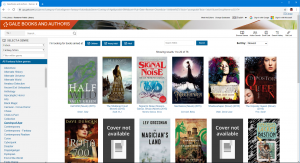
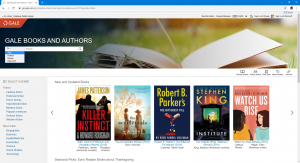
The Books & Authors homepage (as pictured below) is easy to navigate. You can search for books by title, author, series, or keyword. You can also browse New & Updated Books, Seasonal Picks, and Spotlight books on the homepage.

You can also browse books by genre and sub-genres within that category. For example, you can browse titles in Fiction -> Fantasy Fiction -> Coming-of-Age. You can also specify the age range of the books by selecting or deselecting Children, Young Adult, and Adult at the top of the search page.

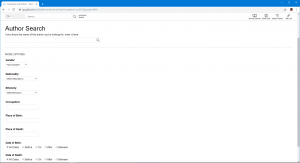
You can also search for authors by name, gender, nationality, ethnicity, occupation, or place of birth/death.

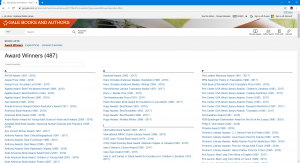
Finally, Book Lists lets you browse recommended reading lists created by librarians and subject experts. The three categories are Award Winners, Expert Picks, and Librarian Favorites.

To search Books & Authors and for more information about all the Power Library databases, please visit the library’s website at www.rostraverlibrary.org and click on the Power Library icon.

Power Library is made possible in part by Library Services and Technology Act (LSTA) funds from the U.S. Institute of Museum and Library Services and through Library Access Funds administered by the Office of Commonwealth Libraries, Department of Education, Commonwealth of Pennsylvania, Tom Wolf, Governor.
Keep up with our services and events by following us on Facebook, Twitter, and Instagram.

Upcoming Rostraver Events

  • Gingerbread Haunted Houses
    When:Friday, October 23, 2026 - 5:30 PM - 5:30 PM;...
  • Adult and Senior Chair YOGA
    When:Monday, October 26, 2026 - 10:30 AM - 10:30 A...
  • RPL Knitters
    When:Monday, October 26, 2026 - 1:00 PM - 1:00 PM;...
  • Tiny Tykes Tadpoles
    When:Wednesday, October 28, 2026 - 10:30 AM - 11:0...

Catalog

Libby

Power Library

Newsletter

Rostraver Library Hours

Monday – Thursday 10:00 am – 7:00 pm
Friday 10:00 am – 1:00 pm
Saturday 9:00 am – 4:00 pm
Sunday Closed

Follow Us

Facebookinstagram

CONTACT

Rostraver Public Library

700 Plaza Drive

Rostraver Township, PA 15012

Phone: 724-379-5511

Fax: 724-379-6090

Email: rostraver@wclibraries.org

⠀

Smithton Public Library

615 Center Street

Smithton, PA 15479

Phone: 724-872-0701

Email: smithton@wclibraries.org

© 2026 Rostraver Public Library & Smithton Public Library | Powered by Minimalist Blog WordPress Theme